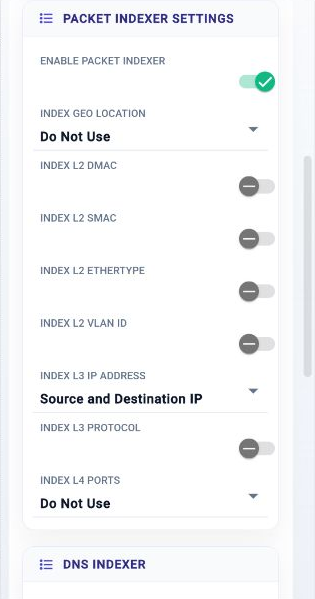
Use these components to collect packets, write packet data, and extract metadata from captured traffic.
Component Reference
Confirm the selected storage, file, rotation, and retention settings before starting a capture service.
NextIO packet capture service components This page documents 3 components in the Capture Services palette group.
For the shared Name, Notes, display, and pad-editing controls, see Common Component Properties.
Packet Capture

Capture and store the packet into the managed storage subsystem
| Connection | Initial count | Initial pad names | Allowed count | Properties panel |
|---|---|---|---|---|
| Input | 1 | 1 | 1 | Hidden (fixed) |
| Output | 1 | Metadata | 1 | Hidden (fixed) |
Configuration Reference
-
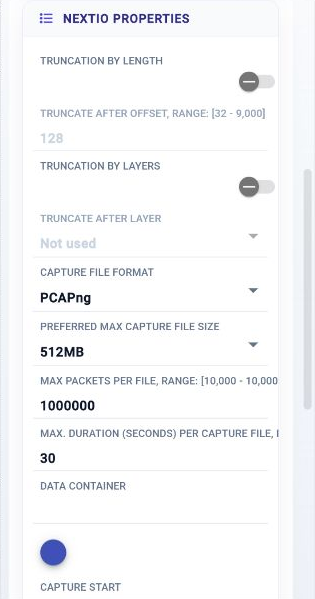
Truncation By length —
Enable truncation by length
Initial value:
Disabled. -
Truncate after Offset —
Truncation the bytes after the offset
Initial value:
128. -
Truncation By Layers —
Enable truncation by protocol layers
Initial value:
Disabled. -
Truncate After Layer —
Truncation the bytes after the layer
Initial value:
0. -
Capture File Format —
Capture file format
Initial value:
pcapng. -
Preferred Max Capture File Size —
Preferred capture file size
Initial value:
512. -
Max Packets Per File —
Max number of packets in a file
Initial value:
1000000. -
Max. Duration (Seconds) Per Capture File —
Max. duration per capture file in seconds.
Initial value:
30. -
Data Container —
Specify the data container used to store the captured packets
Initial value:
Required. -
Capture Start —
Conditions to start capture
Initial value:
service. -
Worker Count —
Capture worker count
Initial value:
1. -
File Writer Count —
File writer count
Initial value:
1. -
Max. Pkt Buffer Size (MB) —
Maximum packet buffer size in MB
Initial value:
128. -
Datapath —
Datapath mode of operations
Initial value:
full. -
Probe —
Probe
Initial value:
None. -
Compute Resources —
Allocate compute resource for the service
Initial value:
1 configured item.
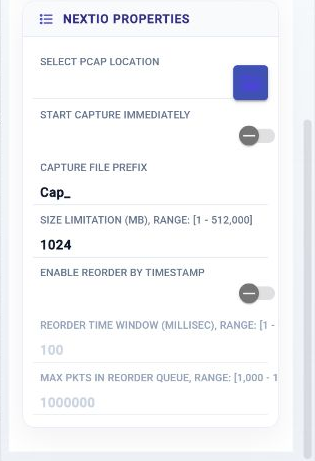
Packet Writer

Write all received packets into a pcap
| Connection | Initial count | Initial pad names | Allowed count | Properties panel |
|---|---|---|---|---|
| Input | 1 | 1 | 1 | Names editable |
| Output | 1 | 1 | 1 | Names editable |
Configuration Reference
-
Select PCAP Location —
Select PCAP file location to store the pcap
Initial value:
Required. -
Start Capture Immediately —
Start capture immediately
Initial value:
Disabled. -
Capture File Prefix —
Prefix for the capture file
Initial value:
Cap_. -
Size Limitation (MB) —
Stop capture when size limit is reached.
Initial value:
1024. -
Enable Reorder by Timestamp —
Reorder packets by packet timestamp.
Initial value:
Disabled. -
Reorder Time Window (millisec) —
Reorder time window measured in millisecond
Initial value:
100. -
Max Pkts in Reorder Queue —
Max. number of packets in the reorder queue
Initial value:
1000000.
Metadata

Extracts and reports metadata from captured traffic.
| Connection | Initial count | Initial pad names | Allowed count | Properties panel |
|---|---|---|---|---|
| Input | 1 | 1 | 1 | Hidden (fixed) |
| Output | None | None | None | Not available |
Configuration Reference
-
Enable Packet Indexer —
Enable Packet Indexer
Initial value:
Enabled. -
Index Geo Location —
Index by Geo Location from IP
Initial value:
none. -
Index L2 DMAC —
Index by destination MAC
Initial value:
Disabled. -
Index L2 SMAC —
Index by destination MAC
Initial value:
Disabled. -
Index L2 EtherType —
Index by L2 EtherType
Initial value:
Disabled. -
Index L2 VLAN Id —
Index by VLAN Id
Initial value:
Disabled. -
Index L3 IP Address —
Index by L3 IP addresses
Initial value:
any. -
Index L3 Protocol —
Index by L3 Protocol
Initial value:
Disabled. -
Index L4 Ports —
Index by L4 Ports
Initial value:
none. -
Enable DNS Packet Indexer —
Enable DNS packet indexer
Initial value:
Disabled. -
Index DNS QR —
Index by DNS QR field
Initial value:
Disabled. -
Index DNS OPCode —
Index by DNS OPCode field
Initial value:
Disabled. -
Index DNS RCode —
Index by DNS RCode field
Initial value:
Disabled. -
Index DNS RR Type —
Index by DNS Resource Record Type field
Initial value:
Disabled. -
Index DNS RR Name —
Index by DNS Resource Record Name field
Initial value:
Disabled. -
Index DNS RR Value —
Index by DNS Resource Record Value field
Initial value:
Disabled. -
Worker Count —
Capture worker count
Initial value:
4. -
Compute Resources —
Allocate compute resource for the service
Initial value:
1 configured item.