Use these components for traffic normalization and conditioning before sending traffic to analysis, capture, or other downstream functions.
Component Reference
Review each component's policy settings before starting or applying a service.
NextIO Advanced Packet Broker functions This page documents 4 components in the Advanced NPB Functions palette group.
For the shared Name, Notes, display, and pad-editing controls, see Common Component Properties.
Deduplication

Deduplicate the incoming packets with dedup policy
| Connection | Initial count | Initial pad names | Allowed count | Properties panel |
|---|---|---|---|---|
| Input | 2 | 1, 2 | 1–32 | Count and names editable |
| Output | 2 | Unique, Duplicated | 1–2 | Hidden (fixed) |
Configuration Reference
-
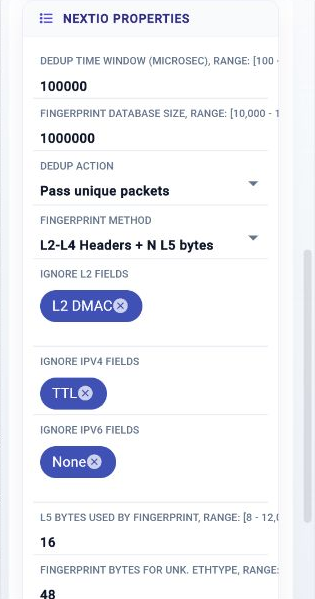
DeDup Time Window (Microsec) —
Dup detection window (100 Microsec - 1 second)
Initial value:
100000. -
Fingerprint Database Size —
Fingerprint database size
Initial value:
1000000. -
DeDup Action —
Action to take when duplication detected
Initial value:
1. -
Fingerprint method —
Method to generate fingerprint
Initial value:
1. -
Ignore L2 Fields —
Ignore fields in the packet
Initial value:
L2 DMAC. -
Ignore IPv4 Fields —
Ignore IPv4 fields in the packet
Initial value:
TTL. -
Ignore IPv6 Fields —
Ignore IPv6 fields in the packet
Initial value:
None. -
L5 Bytes used by Fingerprint —
Number of bytes in L5 for fingerprint
Initial value:
16. -
Fingerprint Bytes for Unk. EthType —
Finger Print length for unknown ethernet type field
Initial value:
48. -
Fingerprint Bytes for Unk. IPProto —
Finger Print length for unknown L3 protocol/NH field
Initial value:
32. -
Compute Resources —
Allocate compute resource for the service
Initial value:
1 configured item.
Microburst Shaper

Smooth microburst traffic
| Connection | Initial count | Initial pad names | Allowed count | Properties panel |
|---|---|---|---|---|
| Input | 1 | 1 | 1 | Hidden (fixed) |
| Output | 1 | 1 | 1 | Hidden (fixed) |
Configuration Reference
-
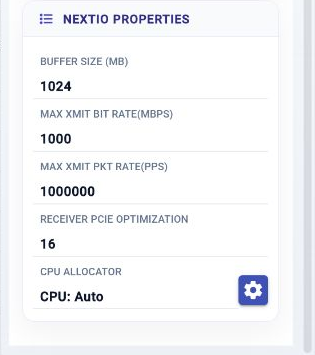
Buffer Size (MB) —
Packet buffer size in the unit of MB
Initial value:
1024. -
Max Xmit Bit Rate(Mbps) —
Max egress bandwidth Mbit/s
Initial value:
1000. -
Max Xmit Pkt Rate(pps) —
Max egress packet rate measured in pkt/s
Initial value:
1000000. -
Receiver PCIe Optimization —
Optimize for server PCIe performance
Initial value:
16. -
Compute Resources —
Allocate compute resource for the service
Initial value:
1 configured item.
Detunnel

Remove the tunnel headers
| Connection | Initial count | Initial pad names | Allowed count | Properties panel |
|---|---|---|---|---|
| Input | 1 | 1 | 1 | Hidden (fixed) |
| Output | 2 | Detunneled, ERSPAN Response | 1–2 | Count and names editable |
Configuration Reference
-
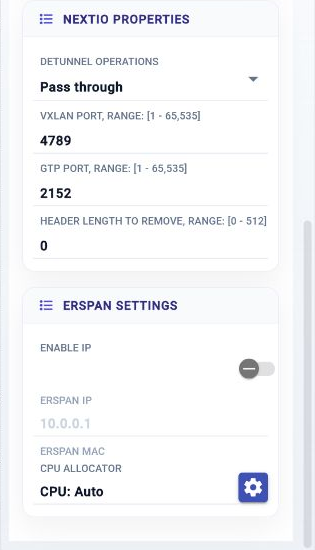
Detunnel Operations —
Detunnel Operations
Initial value:
0. -
VxLAN Port —
VxLAN Port Number
Initial value:
4789. -
GTP Port —
GTP Port Number
Initial value:
2152. -
Header Length to Remove —
Header length to remove
Initial value:
0. -
Enable IP —
Enable IP address
Initial value:
Disabled. -
ERSPAN IP —
ERSPAN IP Address
Initial value:
10.0.0.1. -
ERSPAN MAC —
ERSPAN IP MAC binding
Initial value:
not set.
-
Compute Resources —
Allocate compute resource for the service
Initial value:
1 configured item.
True IP

Restores the original source IP address after address translation.
| Connection | Initial count | Initial pad names | Allowed count | Properties panel |
|---|---|---|---|---|
| Input | 1 | 1 | 1 | Names editable |
| Output | 1 | 1 | 1 | Names editable |
Configuration Reference
-
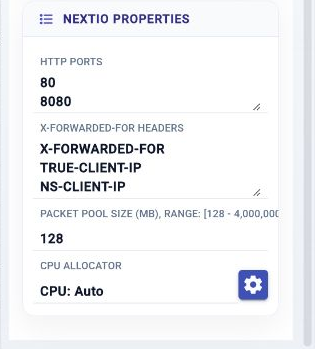
HTTP Ports —
HTTP Ports
Initial value:
80
8080
. -
X-Forwarded-For Headers —
HTTP X-FORWARDED-FOR header names
Initial value:
X-FORWARDED-FOR
TRUE-CLIENT-IP
NS-CLIENT-IP
. -
Packet Pool Size (MB) —
Packet pool size in the unit of MB
Initial value:
128. -
Compute Resources —
Allocate compute resource for the service
Initial value:
1 configured item.