
RFC2544 Benchmark searches for forwarding throughput using saved Packet Database packet sets and dedicated physical TestPorts. It records the measured load trials and search results for each configured frame size and direction. Its available measurements depend on the NIC and the selected execution path.
Return to Validation Tools for the shared test lifecycle and Validation Models for the packet-pattern library.
Build The Port Topology
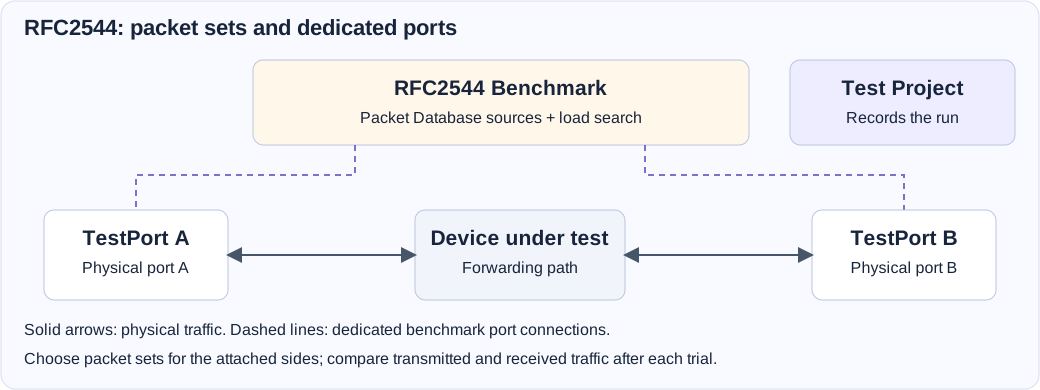
Connect the benchmark's Port A pad directly to one dedicated TestPort. Connect Port B to a second TestPort for a paired test. One attached port is supported for a DUT loopback path.
Add one Test Project to own recording and port sampling. The connected TestPorts supply physical interface identity. The benchmark owns its packet workers and queues; these TestPorts must not also connect to another workload or benchmark.
Prepare Packet Database Sources
Open Models → Validation Models → Test Traffic Patterns → Packet Database Traffic and save the packet definitions and sets for the intended directions. For each attached benchmark side, select Packet Database Traffic Pattern and Packet Set in its properties.
The current resolver requires untagged, unfragmented IPv4/UDP packets. Packets repeat in the saved set's order. Packet Database modifiers are not executed by this benchmark, and a missing set does not fall back to a built-in template. The pattern/set selections are required for the attached sides; they do not require a Testcase or Test Hosts component.
Configure DMAC Discovery for the actual forwarding path. Use packet-template MACs or explicit fixed destination MACs when appropriate. Use ARP requires the correct source IP and target/gateway IP. Enable Use ICMP to check connectivity only with ARP discovery and a target that answers ping. Bridged and routed DUTs may require different next-hop MACs and routes.
Configure The Search
| Control | What it determines |
|---|---|
| Max Test Rate | The rate represented by a 100% offered-load request. |
| Use Bi-directional Traffic | Whether both attached sides generate traffic. |
| Load Search Low Bound / High Bound (%) | The configured load interval to search. |
| First Offerred Load (%) | The starting load for the search. |
| Duration (sec.) per Load Iteration | Measurement duration at each tested load and frame size. |
| Minimum Load Resolution (%) | The configured search resolution. |
| Acceptable Packet Loss | Loss threshold used to assess a valid load trial. |
| Max Iterations Per Packet Length | Bound on the search's iterations for each frame size. |
| Length Mode and packet-length fields | Fixed size, configured list, or increasing/decreasing frame-size sequence. |
| CPU Allocator | The benchmark's processing-resource budget and placement. |
Frame sizes include FCS and must be within 64–9216 bytes and the NIC/path's supported limits. Wire-rate pacing also includes preamble/SFD and inter-frame gap. Ensure the connected ports and their MTU can accommodate every selected frame size.
Use the shared CPU Allocator for worker allocation. Queue and core shortages fail setup rather than silently proving a lower-capacity DUT. The source-port distribution and NIC capabilities also affect how receive work can be spread. Do not assume increasing an allocation splits one repeated flow across all receive queues.
Run A Port-Pair Baseline
- Save a packet pattern with the intended A-to-B and B-to-A packet sets. Check their addresses, MAC handling, and the DUT's forwarding configuration.
- Add the benchmark, two TestPorts, and one Test Project. Select distinct physical ports and cable them through the DUT.
- Connect the benchmark pads directly to the TestPorts and select each side's packet pattern and set.
- Choose the traffic direction, supported maximum rate, initial frame size, load bounds, trial duration, loss threshold, and CPU allocation.
- Save and verify. Start with Stop when complete selected if the service should finalize automatically after the search.
- Inspect current trials and receiver/port health in Test Overview. Let the configured frame-size searches complete.
- Review the recorded directional trials and best results. Expand the frame list or load envelope only after the baseline is understood.
Interpret Trials And Results
Each frame-size search runs measured load trials. Warm-up is outside the measurement window. The runner stops generation, allows bounded receive drain, and records final observations before updating the search.
Keep a failing valid load separate from an invalid measurement. Excess loss or receive errors can fail a valid trial. TX rejection, allocation failure, counter reset, unconfirmed wire transmission, link/speed changes, or other receiver/generator failures can invalidate a trial. An invalid trial aborts rather than narrowing the DUT's search interval as if it measured the forwarding limit.
In Test Overview, review directions A→B and B→A, frame size, requested load, achieved wire rate, receive measurements, outcome, and reason. Best Load Achieved summarizes the best passing load across the configured directions; All Iteration exposes the attempts. Frame-size progress measures search coverage, rather than elapsed-time percentage or an ETA.
The recorded L1 rate timeline and trial table describe different evidence. Missing counter samples or recording gaps remain gaps. Latency and order measurements depend on hardware support; software receive order alone does not establish physical wire order. Compare runs only with equivalent packet sets, frame sizes, directions, resource allocations, and measurement conditions.
Troubleshooting
| Symptom | What to check |
|---|---|
| Verification rejects the packet set. | Saved pattern/set selection and untagged, unfragmented IPv4/UDP packet requirements. |
| Setup reports a port conflict. | Direct dedicated TestPort connections and competing service ownership. |
| ARP or ICMP preparation fails. | Source subnet, next-hop IP/MAC, cabling, DUT routes, and whether ping is allowed. |
| A trial is invalid or generator-limited. | Recorded reason, actual wire TX, link changes, worker allocation, buffer capacity, and receiver health. |
| A load fails on one direction. | Review that direction's packet set, forwarding path, receive counts, and errors separately. |
| Results lack latency or extended counters. | NIC and measurement-path capability; absence is not a measured zero. |
Field Reference
RFC2544 Benchmark field reference and initial values
Initial values describe a newly added component. Saved designs keep their configured values. Dependent fields appear when their controlling option is selected.
| Setting | Purpose | Initial value |
|---|---|---|
| Packet Database Traffic Pattern | Select a packet database from Models / Validation Models / Packet Database Traffic Patterns | Required |
| Packet Set | Repeat the saved packets in order. Every packet must be untagged, unfragmented IPv4/UDP. Modifiers are ignored. | Required |
| DMAC Discovery | Destination MAC discovery | Packet template |
| Fixed DMAC | Fixed Destination MAC | 00:01:00:00:00:01 |
| Source IP for ARP | ARP From Source IP | Not set |
| Target/Gateway IP to ARP | ARP the destination or gateway IP address | Not set |
| Packet Database Traffic Pattern | Select a packet database from Models / Validation Models / Packet Database Traffic Patterns | Not set |
| Packet Set | Repeat the saved packets in order. Every packet must be untagged, unfragmented IPv4/UDP. Modifiers are ignored. | Not set |
| DMAC Discovery | Destination MAC discovery | Packet template |
| Fixed DMAC | Fixed Destination MAC | 00:01:00:00:00:01 |
| Source IP for ARP | ARP From Source IP | Not set |
| Target/Gateway IP to ARP | ARP the destination or gateway IP address | Not set |
| Use ICMP to check connectivity | Require an ICMP echo reply from each ARP target after all ARP exchanges complete and before bulk traffic starts. Requires Use ARP; leave off for devices that block ping. | Disabled |
| Max Test Rate | Max Test Bit Rate | 10 |
| Use Bi-directional Traffic | Send traffic on both ports | Enabled |
| Load Search Low Bound (%) | The minimum load to search in percentage | 0 |
| Load Search High Bound (%) | The maximum load to search in percentage | 100 |
| Duration (sec.) per Load Iteration | Test Duration in Seconds per load iteration per packet length | 30 |
| Minimum Load Resolution (%) | Minimum load resolution before the end of search | 1 |
| Acceptable Packet Loss | Acceptable packet loss | 0.01 |
| First Offerred Load (%) | The starting load used at the begining of the test | 50 |
| Max Iterations Per Packet Length | Max iterations to perform per packet length | 30 |
| Length Mode | Packet Length Mode | inc |
| Packet Fixed Length | Fixed packet length | 128 |
| Incease Length From | Increase length from | 64 |
| Increase Length To | Increase length to | 9216 |
| Increase Step | Length step | 128 |
| Decrease Length From | Decrease length from | 64 |
| Decrease Length To | Decrease length to | 9216 |
| Decrease Step | Length step | 128 |
| List of Packet Length | List of packet length | 128, 256, 512, 1024, 1518 |
| Disable MAC Filter (Promiscuous) | Disable MAC filter, enable promiscuous mode | Enabled |
| Relax for Low end | Allow workers to use separate SMT threads of the same physical core when dedicated cores are insufficient. Maximum throughput and latency measurements may be affected by CPU contention. CPU 0's core and other services remain reserved. | Disabled |
| Execution NUMA | Place TX, RX and order workers together; automatic prefers NIC locality with capacity-based fallback | auto |
| Execution NUMA Node | Strict node selection; insufficient cores or memory fails startup | 0 |
| Compute Resources | Allocate compute resource for the service | 1 configured item |