
WAN Emulator applies a saved timeline of link impairments to one direction of a NextIO packet path. Use it to compare healthy conditions with controlled delay, loss, bandwidth constraints, outages, duplication, reordering, or packet bit flips. It processes incoming traffic and does not generate packets itself.
Return to Validation Tools for the shared lifecycle. Pair the emulator with PCAP Replay or an appropriate live packet path, and use Test Project for recorded test results.
Define A WAN Emulation Profile
Open Models → Validation Models → WAN Emulation Profiles and save a profile. The profile defines the link conditions; the component selects that profile and controls playback. Reusable bandwidth envelopes referenced by phases come from the saved Bandwidth Profiles under QoS-SLA Models.
A profile contains 1–64 ordered phases. A finite phase has a duration; a final zero-duration phase can express conditions that remain until the service stops. A repeating profile requires every phase to have a finite duration.
| Phase control | Interpretation |
|---|---|
| Duration / ramp | Time in the phase and supported transition from the previous phase's numeric settings. Zero ramp changes conditions as a step. |
| Bandwidth profile | Saved rate/burst envelope; no selected envelope means unlimited bandwidth. |
| Outage | Explicit zero-capacity period that holds packets until recovery, subject to bounded queue capacity. |
| Packet loss | Probability of dropping packets. |
| Delay / jitter / maximum delay | Base propagation delay, additional uniform jitter, and an optional cap, authored in microseconds. |
| Reordering | Group packets, retain an ordered prefix, and shuffle the remainder. |
| Duplication | Select packets for one or more additional copies. |
| Bit-error controls | Select packets for a one-bit flip within the eligible packet region. This is not a per-bit physical BER measurement. |
Each phase defines its complete target state. The first phase cannot ramp from a prior phase. Some mode changes require a step rather than interpolation; resolve profile validation errors before using it in a test.
Wire One Direction At A Time
Connect exactly one input and one output on each WAN Emulator instance. For a simple source path, connect PCAP Replay → WAN Emulator → Output Port.
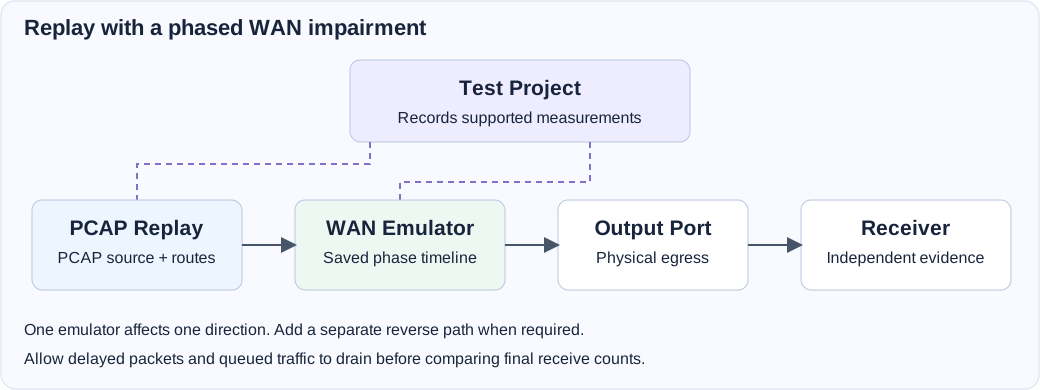
For a bidirectional connection, use the relevant pads' Separate Input / Output display and wire each direction explicitly. Add a second WAN Emulator for reverse impairment. Different instances may use different profiles or offsets. Where a workload supports queue-specific paths, keep matching queue numbers and a complete path in each required direction.
An emulator on a host-preparation path can also impair DHCP, ARP, DNS, or other setup traffic crossing that path. Confirm the baseline setup works before introducing adverse phases. Changing display style does not itself supply the missing reverse connection.
Component Playback Settings
| Setting | Meaning | Initial value |
|---|---|---|
| Enable when start | Apply profile conditions when the service starts. Disabled passes traffic without impairments. | Enabled |
| WAN Emulation Profile | Saved link timeline selected for this component. | Required |
| Start offset (ms) | Start at a position inside the timeline. It is not a delay before playback starts. | 0 |
| Repeat timeline | Cycle the finite timeline until the service stops. | Disabled |
| After last phase | Hold the final conditions, or Pass through for newly processed traffic after the timeline ends. | Hold final phase |
Profile settings are resolved for the run. Editing the reusable profile does not change an already running service. Pass through at the end retains packets already queued; a phase transition does not erase the existing backlog.
Run A Baseline And Impairment Check
- Save a profile with a finite healthy phase followed by a finite phase with one impairment, such as added delay or packet loss. Keep all other impairments disabled initially.
- Build a valid directional path using PCAP Replay, WAN Emulator, and an Output Port. Connect a receiver or independent capture device.
- Select the saved profile, leave Start offset at zero, and disable Repeat for a single playback. Choose Hold final phase or Pass through deliberately.
- Configure a finite replay source with sufficient duration to exercise the intended phases. Add Test Project and a completion grace long enough for the maximum intended delay and remaining backlog.
- Save, verify, and start. Compare receiver behavior during the healthy and impaired phases, changing one impairment at a time.
- Allow traffic to drain before comparing final counts. Review the recorded component statistics and independent receiver evidence together.
For a live bidirectional workload, first establish both healthy paths, then add the intended directional impairment and repeat the same workload.
Read Impairment Measurements
The component publishes input/output observations in both enabled and bypass states. Its statistics also cover loss drops, reorder buffering/releases, duplicates, injected bit errors, queue overflow, allocation/output failures, scheduled delay/bandwidth wait, and current/peak delay-queue occupancy.
Interpret these values at their measurement point. Reorder release counts include the ordered prefix and packets that retained their position, so they are not the number of packets a receiving TCP stack observed out of order. Cumulative scheduled delay is summed across packets, rather than measured end-to-end latency. Queue occupancy and its peak are gauges, not packet rates.
WAN Emulator is not an independent completion source. With Stop when complete, Test Project waits for finite workload sources and then applies the project's completion grace before shutdown. A WAN profile finishing or repeating does not independently start or finish the service. Buffered packets remaining at shutdown may be discarded, so choose the grace period to match the test.
Troubleshooting
| Symptom | What to check |
|---|---|
| Verification rejects the graph. | Exactly one input/output, valid directional wiring, and matching workload queues. |
| The profile cannot repeat. | Every phase must have a finite duration. |
| The first observed phase is unexpected. | Start offset selects a timeline position, rather than delaying playback. |
| Traffic stops during an outage or bandwidth phase. | Configured phase, queue occupancy/overflow, and whether recovery is reached. |
| Only one direction is impaired. | A separate correctly wired emulator is needed on the reverse path. |
| Final counts omit delayed traffic. | Source completion, Test Project grace, queued backlog, and manual-stop timing. |
| A counter seems to imply path latency or BER. | Scheduled delay and one-bit packet flips are component actions, not independent physical measurements. |
Field Reference
WAN Emulator field reference and initial values
Initial values describe a newly added component. Saved designs keep their configured values. Dependent fields appear when their controlling option is selected.
| Setting | Purpose | Initial value |
|---|---|---|
| Enable when start | Apply the timeline when the service starts | Enabled |
| WAN Emulation Profile | Reusable link timeline from Validation Models. All phases and bandwidth envelopes are snapshotted for this run. | Required |
| Start offset (ms) | Start playback this far into the profile timeline | 0 |
| Repeat timeline | Repeat all phases until the service stops. Every phase must have a finite duration. | Disabled |
| After last phase | Behavior when a non-repeating timeline finishes | hold |