
PCAP Replay sends packets from saved PCAP or PCAPNG files into a NextIO packet path. Each source has routes that select packets, apply configured field modifications, and deliver them to named output pads. Use it to reproduce a captured condition or provide a controlled source for a packet-processing test.
Return to Validation Tools for the component list and shared lifecycle. Use Test Hosts when the scenario needs live client/server application conversations. Replaying stored TCP packets does not create a TCP peer that responds to a live application's state.
Output Topology
The component has output pads and no packet input. It starts with one named output, Replay 1; Output Pads supports 1–32 outputs. Connect each route's selected pad to the intended downstream component before verification.
For example, connect Replay 1 to WAN Emulator, then to an Output Port and an independent receiver. Add Test Project when the run should record supported measurements and evaluate selected rules. The replay source can also feed other supported processing/capture paths.
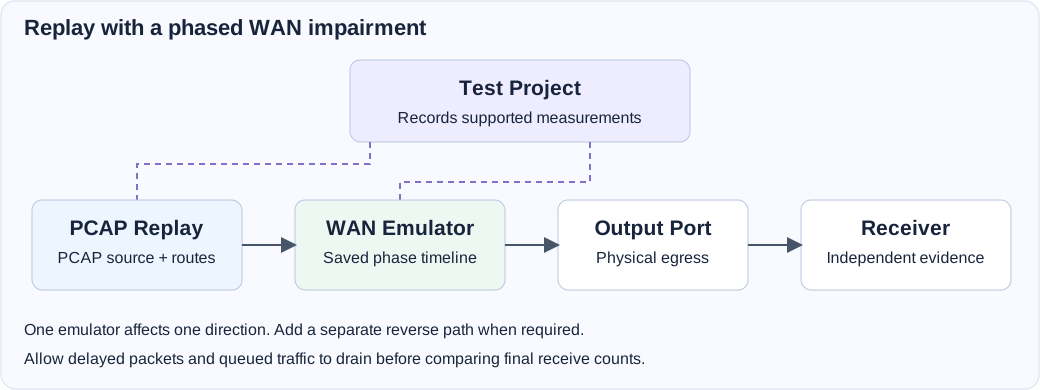
Configure Packet Sources And Routes
Place the capture files in an accessible appliance workspace and select them through Packet Sources. A file on the browser computer must first be made available to the appliance; selecting a local filename alone does not supply its packet contents to a running service.
Each enabled source needs at least one enabled route. Configure the route's Selector → Modifier → Pad chain:
- Selector: constrain the packet fields needed for the route. The editor offers a focused selection of Ethernet, IPv4/IPv6, IP protocol, and transport-port fields, rather than the complete generic Filter editor.
- Modifier: optionally change supported source/destination MAC, IP, or TCP/UDP port fields. Configure valid start/end values and a positive step where the modifier editor requests a sequence.
- Pad: select an existing output pad and connect that pad to its intended downstream path. Review route assignments again after changing output pads.
The source editor permits up to 64 packet sources and 256 routes per source. The effective operating capacity also depends on the input files, routes, modifications, downstream path, and processing resources. Begin with a single source and route before expanding the design.
Timing, Rate, And Completion
| Setting | Purpose | Initial value |
|---|---|---|
| Merge by Timestamp | Merge multiple sources using their capture timestamps. | Enabled |
| Use Original Timestamp | Preserve capture timing when pacing replay. | Enabled |
| Traffic Rate Type | Choose original packet intervals, a packet rate, or a throughput rate; configure the corresponding value. | Original packet intervals |
| Duration Type | Choose unlimited execution or completion by packet count, time, or loop count. | Unlimited |
| Packet Count | Packet limit when packet-count completion is selected. | 1000 |
| Loop Count | Number of full source replay passes when loop completion is selected. | 1 |
Packet-rate controls offer pps, Kpps, and Mpps; throughput controls offer Kbps, Mbps, and Gbps. Select a rate appropriate to the egress link and downstream processing capacity. A configured target is not evidence that every packet was transmitted or received.
Choose a finite duration policy when Stop when complete should finalize the test. For a path with WAN delay or buffering, configure enough completion grace on Test Project for the intended drain. Unlimited replay remains active until stopped.
Run A Single-Source Baseline
- Choose a small known capture and confirm its packet destinations are valid for the intended test path.
- Add PCAP Replay and an Output Port, connect Replay 1 to the output, and select the physical egress interface. Attach a receiver or capture device. Add Test Project for recording.
- In Packet Sources, add and enable the capture. Create one enabled route to Replay 1. Begin with a broad selector and no modifiers, then narrow it after establishing the baseline.
- Select a modest fixed packet rate, such as 1000 pps, and Loop Count completion with one loop.
- Save, verify, and start. Check replay state and the receiving observation.
- Let the replay complete and the path drain. Review execution, recording completeness, and any acceptance rules before comparing later runs.
- Add selectors, modifiers, multiple sources, or WAN impairment one change at a time, keeping the capture and settings with each result.
Runtime Controls And Observations
The running component exposes Pause while replay is active and Resume while paused. These controls preserve the replay position. Exposed rate controls support live changes; use them only when rate changes belong to the test plan. Source files, routes, and topology require a new run.
Inspect the replay's playback state and progress alongside downstream port and receiver/capture observations. Selection, modification, routing, and downstream drops can make output counts differ from a capture's original packet count. Document runtime pauses or rate changes when interpreting a recorded test.
Troubleshooting
| Symptom | What to check |
|---|---|
| Verification reports no enabled source or route. | Enable at least one source and an enabled route within that source. |
| A source cannot be opened. | Its appliance-side path, file access, and PCAP/PCAPNG format. |
| A route references an invalid pad. | Existing Output Pads and the selected destination for each route. |
| No traffic appears at the receiver. | Selector criteria, route enable state, output wiring, destinations, and egress interface. |
| Modified packets do not match expectations. | Supported modifier field, address family, start/end values, and step. |
| Replay does not complete automatically. | Duration Type, packet/time/loop limit, paused state, and Stop when complete. |
| A replayed application exchange fails. | Whether a live stateful responder is required; use Test Hosts for application activities. |
Field Reference
PCAP Replay field reference and initial values
Initial values describe a newly added component. Saved designs keep their configured values. Dependent fields appear when their controlling option is selected.
| Setting | Purpose | Initial value |
|---|---|---|
| Packet Sources | Configure each PCAP packet source and its Selector -> Modifier -> Pad routes | Configured in the editor |
| Merge by Timestamp | Merge packets from multiple PCAP packet sources by capture timestamp | Enabled |
| Use Original Timestamp | Preserve capture timing when pacing replay | Enabled |
| Duration Type | Select when replay completes | unlimited |
| Packet Count | Stop after transmitting this many packets | 1000 |
| Duration (Day:Hour:Minute.Second) | Stop after this replay duration | 00:00:01.00 |
| Loop Count | Replay all packet sources this many times | 1 |
| Traffic Rate Type | Select how to pace replay traffic | Original packet intervals |
| Packet Rate (pps) | Packets per second | 1000 |
| Packet Rate (Kpps) | Thousands of packets per second | 1 |
| Packet Rate (Mpps) | Millions of packets per second | 1 |
| Throughput (Kbps) | Kilobits per second | 1000 |
| Throughput (Mbps) | Megabits per second | 1 |
| Throughput (Gbps) | Gigabits per second | 1 |
| Extra Packet Pool Size (MB) | Additional packet-buffer memory above the automatically calculated queue requirement. Zero uses automatic sizing. Applied when the service starts; separate from PCAP file-data memory. | 0 |