
Test Hosts represents a population of network identities on the test network. Each identity has its own MAC/IP binding. The component can initiate client activities, serve application traffic, provide hosted DHCP/DNS services, or combine client and server functions on the same population.
Use Test Hosts with one TestPort queue and one Test Project per service. Connect the component's Network pad to its TestPort. TestPort chooses the physical interface; Test Hosts defines the host population and behavior.
Return to Validation Tools for the component selection table, shared test lifecycle, packet generation, replay, RFC2544, and WAN impairment.
On this page: configuration ownership, host network, client activities, server activities, DHCP and DNS, TLS, paired test, and results.
Configuration Ownership
| Configure this in | What it controls |
|---|---|
| Test Hosts | Role, addresses, host population, VLAN, hosted services, activity assignments, destinations, and TLS settings. |
| Activity Profile / Testcase | Which activities participate, their Traffic Patterns, offsets, target scopes, and load phases. |
| Traffic Pattern | Client/server traffic behavior, payloads, connection actions, and the default service port. |
| TestPort | Physical interface, queue attachment, MTU, and port measurements. |
| Test Project | Run identity, recording policy, measurement interval, completion grace, and selected Validation Rules. |
Save the required models before selecting them in a component. A profile selection defines the workload; it does not start traffic. The destination selection is a logical binding, while the Network connection and physical cabling carry the packets.
Open Models → Validation Models → Test Traffic Patterns to define traffic behavior, then use Testcases to assemble test activities and their load phases. A testcase is the Activity Profile selected by the Test Hosts client and server profile controls. The Validation Models overview explains all four main nodes, including WAN Emulation Profiles and Validation Rules.
Host Network
Network Role selects Client Network, Server Network, or Client and Server Network. Role and address acquisition are independent: a DHCP client can still perform server functions when the selected role allows them.
| Setting | How to choose it |
|---|---|
| VLAN Mode / VLAN ID | Use Untagged or one IEEE 802.1Q VLAN for all preparation, services, and activities in this component. Tagged VLAN IDs are 1–4094. |
| Addressing | Select Static IPv4 or DHCPv4 clients. Each DHCP host acquires its own lease over the test network. |
| Static IPv4 Address / Prefix Length | Define the first host and subnet. Further static hosts use consecutive addresses; the complete range must fit the intended network. |
| Gateway | Set the next hop for off-link destinations. Leave empty for a directly connected test that does not need a gateway. |
| Host Count | Set the number of independent identities. Begin with a small population before increasing load. The editor accepts up to 1,048,576 identities; execution capacity depends on resources and workload. |
| First MAC | Optionally supply the first unicast MAC. Leaving it empty allocates a stable component-specific range. Avoid overlapping ranges across attached populations. |
| Host Name Prefix | Optionally give DHCP hosts names suffixed by their host ordinal. |
| Expected DHCP Server | Optionally require a particular DHCP server identifier. Discovery still crosses the test network. |
Hosted DHCP and DNS services currently require one static host in their serving group. IPv6 host addressing and multiple VLANs within a Test Hosts component are outside this configuration.
Client Networks And Activities
Select a Client Activity Profile to initiate workload traffic. Leave it empty for a group used only for server activities or hosted services.
Choose Client Destination Type:
- Server Component: select another Test Hosts instance in Target Server Component. Configure that server's Server Activity Profile with every required Traffic Pattern. The binding uses the matching listener's effective port.
- External server: configure External Activity Destinations for each enabled activity. Supply IPv4 addresses, a CIDR, or an inclusive range, with an optional port override. No peer component is required in the diagram.
A Traffic Pattern's service port is the default. A configured destination or listener override takes precedence. New TCP patterns default to port 8080; select the port that matches the actual service under test.
Activity Profiles can mix native TCP and HTTP/HTTPS activities. HTTP/1.1 GET/POST execution uses explicit client and server connection actions. Configure the response expectations you need: a received HTTP error status is not an automatic activity failure when response checking is disabled. Connection rate and HTTP request rate are different measurements, especially with connection reuse.
When an activity uses a population target, its target applies to the population as a whole. For example, 100 hosts with a population target of 100 connections/s request 100 connections/s in total, rather than 100 per host. Review the profile's target scope before scaling host count.
API Client Traffic Patterns use API Input Values for declared inputs when selected. These inputs must match the pattern's declarations. API execution and native TCP/HTTP activity execution cannot share the same Test Hosts assignment; use separate groups for those workloads.
External native activity destinations currently use IPv4 addresses, with up to 4096 distinct destination addresses per component. Resolving required DNS names during preparation does not make hostname activity destinations available.
Server Networks And Listeners
Select a Server Activity Profile containing the Traffic Patterns the group must serve. The server runs those patterns' server programs; client load phases do not schedule server-side connections.
The runtime generates listeners once per distinct Traffic Pattern. Configure Listener Connection Capacity for the default concurrent session capacity, and use Pattern Listeners only when a pattern needs a listening-port or capacity override. No manually authored listener rows are needed for defaults.
Multiple clients may target the same group, provided the server profile contains their required patterns. Incompatible patterns cannot share one listening port. An enabled DNS server also owns TCP port 53, so an activity listener must use another port.
A server-only group needs neither a Client Activity Profile nor a client destination. It stays available until stopped. A client finishing in a separate service does not stop that server.
Older designs that relied on automatic linked responders must explicitly select a Server Activity Profile before verification or execution. Linking a client no longer creates or changes server listeners.
Hosted DHCP And DNS
Under Server Networks → Host Services, independently enable and configure the services required by the scenario. Keep the serving group at one static host.
DHCPv4 Service
Configure the address pool, subnet/prefix, advertised gateway/router, DNS servers, and lease time. Use a separate client group with DHCPv4 addressing to exercise address acquisition over the physical test path.
Every required client must acquire a valid binding before workloads start. Lease acquisition, renewals, and failures belong to the run's recorded host history. The current client contract renews against the selected server; relay, T2 rebinding, and multi-server failover are outside this stage.
DNS Service And Client
The hosted DNS service provides authoritative A, AAAA, and CNAME records, per-record TTLs, and optional forwarding to explicitly configured IPv4 upstream resolvers. It uses the test network rather than management DNS.
On clients, enable Enable DNS Client. Set DNS Servers, or leave the field empty to use each host's DHCP-provided DNS option. Enter Required DNS Names to gate preparation, and configure Query Timeout (ms) and Query Attempts. All required hosts must resolve the required names. Cached answers honor TTLs; DNS queries are not a substitute for validating application reachability.
DNSSEC validation, DoH/DoT, dynamic DHCP-to-DNS registration, and IPv6 client transport are outside the current service. NTP and certificate-preparation services are not part of this hosted-services configuration.
TLS And HTTPS
Use the Test Hosts client trust and server identity controls for TLS/HTTPS activities. These settings apply to the group's encrypted activities; plain TCP and HTTP activities may coexist.
- Configure the server identity and certificate chain on the server group.
- Keep server-certificate verification enabled on the client. Use system trust for a trusted certificate, or select custom trust certificates for a test certificate.
- Ensure the server certificate's Subject Alternative Names match the destination IP or configured TLS Server Name. An empty TLS Server Name verifies the destination IP; a configured name supplies SNI and the verification name.
- Configure the permitted TLS versions and handshake timeout for the scenario. Verify the profile's connection actions before starting.
Missing server identity or invalid custom trust fails preparation. HTTPS does not fall back to unencrypted HTTP. The current native HTTP path supports HTTP/1.1; it does not emulate a browser or provide HTTP/2/3.
Configure A Paired Test
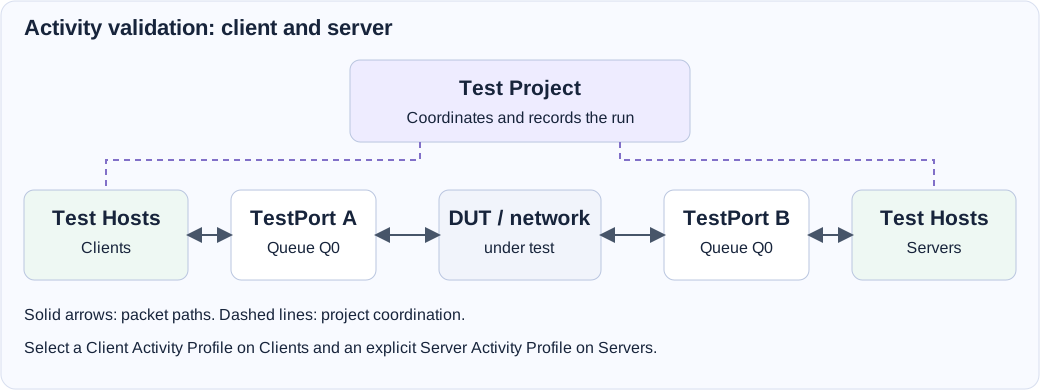
This example assumes a single test subnet passes through the device under test. Use ranges and gateways appropriate to your own topology.
- Save a finite TCP Activity Profile and its Traffic Pattern, with matching client/server programs, connection actions, and service port.
- Add one Test Project, two TestPorts, and two Test Hosts components. Name
the host groups
ClientsandServers. - Select distinct physical ports and leave Queue Count at one for both TestPorts. Connect each host group's Network pad to its own TestPort Q0.
- For
Clients, select Client Network, Static IPv4,198.18.0.10/24, and Host Count1. Select the Client Activity Profile and Server Component destination type. - For
Servers, select Server Network, Static IPv4,198.18.0.100/24, and Host Count1. Select a Server Activity Profile containing the required Traffic Pattern. In the clients' Target Server Component, selectServers. - Give Test Project a meaningful name. Leave Recording Policy at Required, and select Validation Rules if the test needs an acceptance verdict.
- Cable the selected interfaces through the test path, save the diagram, verify it, and start with Stop when complete selected. Inspect preparation, connection/activity counters, and port traffic, then review the final TestDB.
After this baseline succeeds, increase host count or activity load separately. For a DHCP test, configure a reachable DHCP service and change the clients' addressing mode. For HTTPS, add the server identity and client trust before running the encrypted pattern.
Preparation And Results
Host Preparation gates the workload. It waits for local TestPort carrier readiness and the configured address/DNS requirements, within Preparation Timeout (s), initially 60 seconds. Failure of a required host fails setup and preserves the setup result. Remote application reachability is subsequently a workload result.
Test Project releases prepared workloads against a shared start clock and records measurements through completion and drain. Review host binding/history records, connection attempts and failures, activity completions, HTTP request/response/body counters where applicable, and TestPort measurements. Check recording completeness and Validation Rules separately from the execution's completed/failed state.
| Problem | Review |
|---|---|
| Required hosts are not ready. | Link, VLAN, address range, DHCP server, required DNS names, and preparation timeout. |
| A linked server fails verification. | Explicit Server Activity Profile and matching Traffic Patterns on the destination group. |
| Connections fail after preparation. | Effective listener port, client destination, gateway/ARP, listener capacity, and explicit connection actions. |
| HTTPS setup fails. | Server identity, certificate SANs, client trust, TLS Server Name, versions, and handshake timeout. |
| Load differs from the expected total. | Profile target scope, host participation, phase duration, and connection reuse. |
| The server remains active after clients complete. | A standalone server is continuous; stop it explicitly when the test is finished. |
Field Reference
Test Hosts field reference and initial values
Initial values describe a newly added component. Saved designs keep their configured values. Dependent fields appear when their controlling option is selected.
| Setting | Purpose | Initial value |
|---|---|---|
| Network Role | Choose which client and server functions run on this host population | client |
| VLAN Mode | One IEEE 802.1Q VLAN for all hosts and traffic in this component | untagged |
| VLAN ID | VLAN used by host preparation, services and client/server activities | 1 |
| Addressing | Acquire an independent lease per host, or configure a static service host | static |
| Static IPv4 Address | First static host address; subsequent hosts use consecutive addresses | 10.77.0.1 |
| Prefix Length | Static host subnet prefix | 24 |
| Gateway | Optional static gateway; also advertised by the DHCP server | Not set |
| Host Name Prefix | Optional DHCP host names are suffixed with a stable host ordinal | Not set |
| Host Count | Number of independent host identities | 1 |
| First MAC | Optional first unicast MAC; empty allocates a stable component-specific range | Not set |
| Expected DHCP Server | Optional required server identifier; discovery still travels over the test network | Not set |
| Enable DNS Client | Resolve names using each host's test-network identity | Disabled |
| DNS Servers | IPv4 resolver addresses separated by spaces; empty uses this host's DHCP DNS option | Not set |
| Required DNS Names | Names separated by spaces; all hosts must resolve them before the test starts | Not set |
| Query Timeout (ms) | Timeout for each DNS exchange | 1000 |
| Query Attempts | Bounded attempts across the configured resolvers | 2 |
| Client Activity Profile | Optional initiating workload; independent of server listeners and hosted services | Not set |
| Client Destination Type | Use a configured Server Component or explicit external IPv4 destinations | component |
| Target Server Component | Select another Test Hosts component. Configure its Server Activity Profile with the required Traffic Patterns. | Not set |
| External Activity Destinations | Server IPv4 address, CIDR or range and listening port for each enabled activity. No server component is required in this design. | None |
| API Input Values | Run-specific values for declared API inputs. Names must match the Traffic Pattern input declarations. | None |
| TLS Server Name | SNI and verification name; empty verifies the destination IP address | Not set |
| Verify Server Certificate | Validate trust and the server DNS name or IP address. Disable only to skip certificate checks for a test; TLS encryption remains enabled. | Enabled |
| Trust Store | Use system trust or explicitly trust test certificates | system |
| Trusted Certificates | Trust anchors including a generated self-signed test certificate | Configured in the editor |
| Host Services | Configure independently enabled services on this host | Not set |
| Server Activity Profile | Traffic Patterns served by this component; client load phases are not executed. Required when another component targets this server. | Not set |
| Listener Connection Capacity | Default maximum concurrent sessions per configured listener | 10000 |
| Pattern Listeners | Listeners are generated once per Traffic Pattern in the Server Activity Profile. Optional port/capacity overrides belong to this Test Hosts group. | None |
| TLS Identity | Certificate and private key saved with this diagram | Configured in the editor |
| TLS Version | Allowed protocol versions | auto |
| Handshake Timeout (ms) | Maximum time from TCP establishment to TLS readiness | 10000 |
| Log master keys | Write TLS session secrets and connection details to tls-keys.log beside test.testdb. Use with a packet capture to validate decryption. Requires a Test Project. | Disabled |
| Preparation Timeout (s) | All hosts must acquire valid bindings before test workloads can start | 60 |
| Compute Resources | Allocate compute resource for the service | 1 configured item |