Use diagnosis components temporarily to investigate how selected packets move through a service.
Component Reference
Set narrow trace criteria and remove or disable diagnostic collection after the investigation is complete.
FlowMagic diagnosis components This page documents 1 components in the Diagnosis Tools palette group.
For the shared Name, Notes, display, and pad-editing controls, see Common Component Properties.
Packet Tracer

Runtime packet tracer diagnosis component
| Connection | Initial count | Initial pad names | Allowed count | Properties panel |
|---|---|---|---|---|
| Input | None | None | None | Not available |
| Output | None | None | None | Not available |
Configuration Reference
-
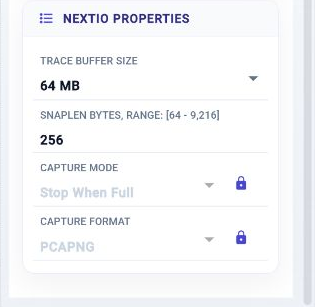
Trace Buffer Size —
Maximum in-memory trace buffer size
Initial value:
67108864. -
Snaplen Bytes —
Maximum captured bytes per packet
Initial value:
256. -
Capture Mode —
Trace behavior when the buffer is full
Initial value:
Stop when full. -
Capture Format —
Saved trace file format
Initial value:
pcapng.