
Validation Tools brings traffic sources, test endpoints, link impairment, and result recording into the same NextIO diagram. Choose the components for your test, connect their packet paths, and use a Test Project to coordinate and record the run.
The reusable test activities and traffic definitions come from Models → Validation Models. Define and save them there, then select them in the diagram's components.
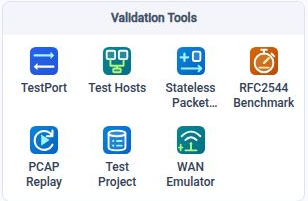
Overall Architecture
Validation has three connected layers. Saved models describe the workload; the NextIO diagram binds those definitions to traffic components and physical ports; Test Project coordinates the run and records its measurements.
| Layer | Responsibility | Main elements |
|---|---|---|
| Validation Models | Save reusable traffic behavior, activities, WAN conditions, and acceptance criteria. | Test Traffic Patterns, Testcases, WAN Emulation Profiles, and Validation Rules. |
| NextIO service design | Choose the physical interfaces and connect the components that execute the workload. | TestPort, Test Hosts, RFC2544 Benchmark, Stateless Packet Generator, PCAP Replay, and WAN Emulator. |
| Test Project and results | Identify the test, coordinate completion, record measurements, and provide evidence for report-time assessment. | One Test Project, the service view, and each execution's TestDB recording. |
The main relationships are:
- Activity tests: Traffic Pattern → Testcase → Test Hosts → TestPort → network under test. Client and server Test Hosts use explicit profile bindings.
- Packet benchmarks: Packet Database Traffic → RFC2544 Benchmark → dedicated TestPorts → network under test. The benchmark selects packet sets directly; it does not require a Testcase.
- Replay and impairment: PCAP Replay → WAN Emulator → Output Port → network under test. The WAN component selects a saved WAN Emulation Profile and affects one direction.
- Coordination and evidence: Test Project applies to the service and has no packet pads. It records supported measurements; Validation Rules define the acceptance criteria separately from traffic generation.
Start with the RFC2544 walkthrough, or use Components to choose the elements for another design.
Validation Models
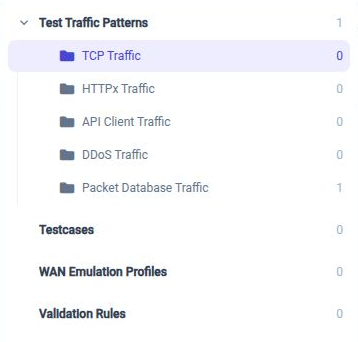
Open Models in the activity bar and select Validation Models. Use Browse to open its navigation tree. It has four main nodes:
| Main node | What you define | Where it is used |
|---|---|---|
| Test Traffic Patterns | Reusable traffic behavior and packet definitions, organized into TCP Traffic, HTTPx Traffic, API Client Traffic, DDoS Traffic, and Packet Database Traffic. | Activities reference their Traffic Patterns. RFC2544 Benchmark selects Packet Database Traffic patterns and packet sets directly. |
| Testcases | Test activities, their selected Traffic Patterns, participation, offsets, target scopes, and load phases. | Select the testcase in Test Hosts through Client Activity Profile or Server Activity Profile. |
| WAN Emulation Profiles | Saved timelines of link conditions, with phases and impairment settings. | Select the profile on WAN Emulator. |
| Validation Rules | Reusable acceptance criteria, thresholds, severities, and missing-data policies. | Select a rule when generating a report from a finalized TestDB. |
Test Traffic Patterns And Test Activities
Under Test Traffic Patterns, choose the collection that matches the test:
- TCP Traffic defines client/server connection programs and transfers.
- HTTPx Traffic defines HTTP/HTTPS request and response behavior.
- API Client Traffic defines API request workflows and their inputs.
- DDoS Traffic contains DDoS traffic definitions. The collection's presence does not mean that every pattern can run through every activity executor; use the supported pattern types for the selected test configuration.
- Packet Database Traffic contains saved packet definitions and packet sets used by packet-based tests such as RFC2544 Benchmark.
Use Testcases to assemble Traffic Patterns into test activities and define how those activities run over time. Testcase is the library's UI name for an Activity Profile; the Test Hosts properties retain the labels Client Activity Profile and Server Activity Profile. Assign the client profile to initiate the scheduled workload, and explicitly assign the server profile containing the patterns that the destination must serve.
For an activity test, the configuration flow is Traffic Pattern → Testcase → Test Hosts → TestPort. Test Project records the measurements. Select Validation Rules when generating the report for acceptance assessment. For a packet benchmark, select the Packet Database pattern directly on RFC2544 Benchmark; a Testcase is not required for that selection.
Save model changes before verifying or starting a service. The running test uses its resolved configuration; editing a reusable model does not change an already running workload.
Prepare, Run, And Review
- Define the workload and expected result. Under Models → Validation Models, save Traffic Patterns and assemble test activities under Testcases. For a packet benchmark or impairment test, prepare the Packet Database pattern or WAN Emulation Profile instead. Select reusable Validation Rules when the test needs a recorded acceptance decision.
- Build and save the diagram. Add the traffic components, select the intended physical ports, and connect the packet paths. Include exactly one Test Project when using TestPort or Test Hosts. Save the design in an accessible workspace before starting a recorded run.
- Check the setup. Verify port ownership, cabling, link readiness, MTU, addresses, VLANs, destination settings, profiles, and available processing resources. Use Verify to check the saved design. Begin with a rate appropriate for the connected test network.
- Start the test. The start workflow offers Stop when complete for finite tests. Host Preparation establishes required addresses and DNS bindings before scheduled workloads are released. A required preparation failure fails the run; it does not silently reduce the host population.
- Observe and finish. Open the service view to inspect component statistics, errors, and workload progress. Allow finite workloads and queued packets to drain. Services that only provide listeners or hosted network services remain available until stopped.
- Review the recording. Test Project creates a separate
Test_Results/<device-local timestamp>/test.testdbbeside the saved design for each run. Inspect execution state, recording completeness, and component measurements. Follow Validation and Report to select Validation Rules and assess the finalized evidence. A completed run is not an acceptance pass.
Changes to traffic models or the saved design belong to a subsequent run. Save traffic changes and use the service's start/restart workflow to adopt them; opening an editor does not change an already running test. Recorded results retain the configuration used for that execution. Validation Rule changes can be applied in a new report from the same TestDB.
Worked Examples
Client And Server Activity Validation
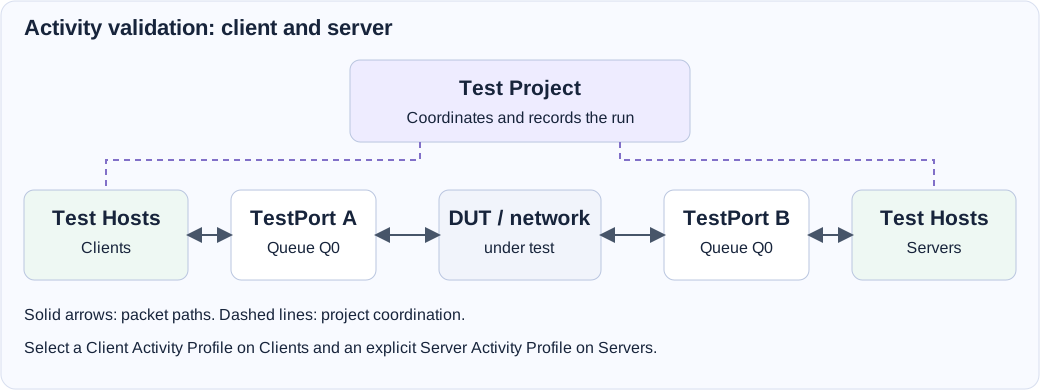
- Save a TCP Traffic Pattern with matching client/server programs, explicit connection actions, and a service port. Create a finite Activity Profile that references it. Begin with a small connection rate and host population.
- Create a diagram with two Test Hosts, two TestPorts, and one Test Project. Cable the physical ports through the device or network under test.
- Configure
Clientswith a suitable static address range, Client Network, and the Client Activity Profile. ConfigureServerswith a non-overlapping static range, Server Network, and a Server Activity Profile containing the required Traffic Pattern. - Select
Serversas the clients' Target Server Component. Connect each Test Hosts Network pad to its own TestPort queue. Add gateways when the destination is off-link. - Save, verify, and start with Stop when complete selected. Confirm Host Preparation succeeds, then compare attempts, established connections, completed activities, failures, and port traffic in the service view.
- Open the recorded TestDB and check completion, recording completeness, and any selected Validation Rules. Continue with DHCP, DNS, HTTP/HTTPS, or larger populations only after the baseline behaves as expected.
The Test Hosts guide explains the client/server settings in detail.
RFC2544 Port-Pair Throughput
Follow RFC2544 Getting Started Guide for the complete packet database and guided Test Service workflow.
Replay With WAN Impairment
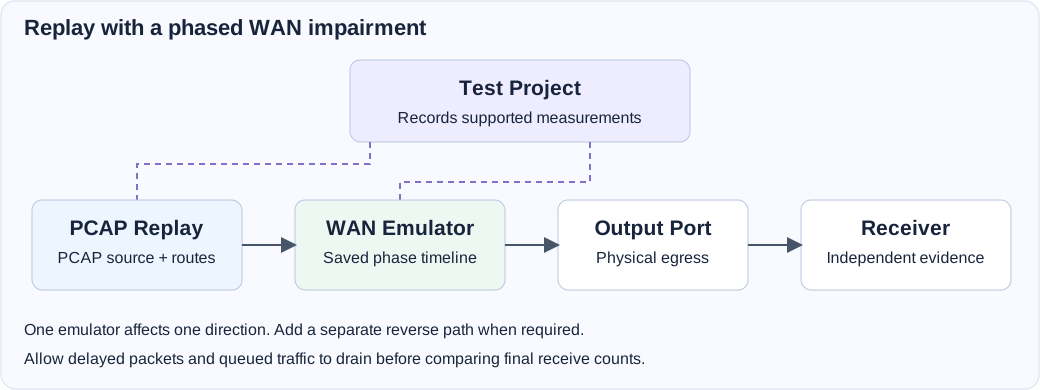
- Select a known PCAP and create a WAN Emulation Profile with a finite healthy baseline phase followed by a delay or loss phase.
- Add PCAP Replay, WAN Emulator, Output Port, and a Test Project. Connect the replay output to the emulator input, and the emulator output to the output port. Attach an independent receiver or capture device to the physical port.
- In Packet Sources, route the enabled source to the connected output pad. Choose a finite replay duration/loop count and a modest replay rate. Select the saved WAN profile and its end behavior.
- Save, verify, and start. Compare the healthy and impaired phases at the receiver. Use replay Pause/Resume only when pausing is part of the test.
- Allow delayed packets to drain before comparing counts. Review the TestDB and receiver evidence together. Add a second directional path when the scenario requires reverse traffic.
Troubleshooting
| Symptom | Check first |
|---|---|
| Verification reports a missing project or unavailable port. | Include one Test Project for TestPort/Test Hosts, select distinct intended interfaces, and release conflicting service ownership. |
| Host Preparation fails. | Check link readiness, address ranges, VLAN, DHCP reachability, required DNS names, and Preparation Timeout. Inspect the preserved setup result. |
| A client cannot use a linked server. | Select the server's Server Activity Profile, include each required Traffic Pattern, and check effective ports and listener capacity. |
| The source transmits but no receiver traffic appears. | Check cabling, packet destinations, MAC/ARP settings, routing, MTU, and the actual receiving interface. |
| Replay fails verification. | Check that PCAP inputs are accessible, a source is enabled, and every route refers to an existing output pad. |
| A WAN path does not forward. | Check the one-input/one-output topology, direction, selected profile, and each phase's bandwidth or outage settings. |
| A finite test remains active. | Check for unlimited replay, continuous listeners/services, Stop when complete, and pending drain or completion grace. |
| The run completed but has no acceptance assessment. | Generate a report with a Validation Rule selected. Review enabled checks, missing-data policy, and the recorded measurements. |
The current palette replaces the former STL PktGen, AppSim Center, and Bit Error Rate workflow. Use the components and reusable models described here when creating a new validation design. Review older saved designs against the current properties before running them.