Use these components to observe service state or SMEP status and make that state available to a NextIO service.
Component Reference
Select the monitored source and configure the component's reporting or state behavior before applying the service.
NextIO monitor service components This page documents 2 components in the Monitors palette group.
For the shared Name, Notes, display, and pad-editing controls, see Common Component Properties.
State Mon

Cluster state monitor
| Connection | Initial count | Initial pad names | Allowed count | Properties panel |
|---|---|---|---|---|
| Input | None | None | None | Not available |
| Output | None | None | None | Not available |
Configuration Reference
-
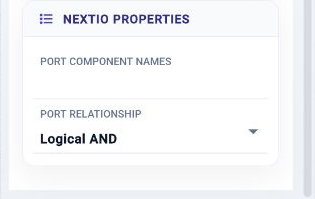
Port Component Names —
Component name for the ports to monitor
Initial value:
Required. -
Port Relationship —
Operation applied to individual port state
Initial value:
and.
SMEP Monitor

SMEP monitor
| Connection | Initial count | Initial pad names | Allowed count | Properties panel |
|---|---|---|---|---|
| Input | 1 | 1 | 1 | Names editable |
| Output | None | None | None | Not available |
Configuration Reference
-
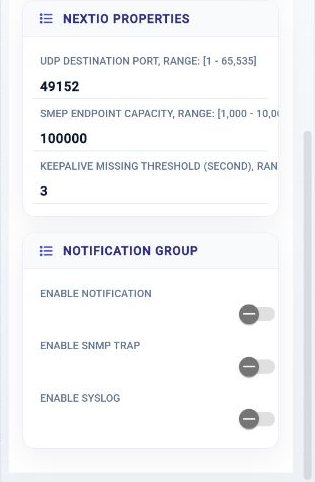
UDP Destination Port —
SMEP UDP Destination Port
Initial value:
49152. -
SMEP Endpoint Capacity —
SMEP endpoint capacity
Initial value:
100000. -
Keepalive Missing Threshold (second) —
Keepalive missing threshold measured by seconds
Initial value:
3. -
Enable Notification —
Enable Notification
Initial value:
Disabled. -
Enable SNMP trap —
Enable SNMP trap
Initial value:
Disabled. -
Enable Syslog —
Enable Syslog
Initial value:
Disabled.