
Use this volume while selecting and configuring components in a FlowDirector NextIO service. The reference follows the component groups shown in the Diagram Editor and documents each component's purpose, initial diagram connectivity, configuration settings, and initial values.
For editor operation, file handling, verification, and service lifecycle controls, see the NextIO Diagram Editor and NextIO Services manuals.
Common Component Properties
Select a component on the diagram and open Properties to edit its shared fields. Most NextIO components use the same Component, Display Properties, and Connectivity sections; component-specific fields appear below them.
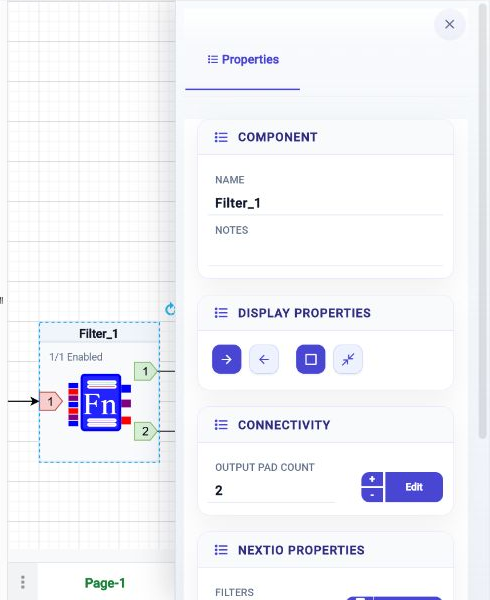
A selected Filter component. The highlighted display buttons are Left to Right and Full Size. Its output count is editable and its pad names open from Edit.
| Section | Property or control | What it does | Initial value |
|---|---|---|---|
| Component | Name | Identifies the component in the diagram and service configuration. New components receive a generated name such as Filter_1; keep every component name unique. |
Generated for the component type |
| Component | Notes | Stores an optional description or comment about the selected component. | Empty |
| Display Properties | Left to Right / Right to Left | Sets the direction in which packet flow is presented on the component face. | Left to Right |
| Display Properties | Full Size / Compact Size | Switches between the normal detailed face and the smaller compact face. | Full Size |
| Connectivity | Input Pad Count, Output Pad Count, or Pad Count | Sets how many connectors the component exposes when that count is configurable. Use + and − or enter the count. | Component-specific |
| Connectivity | Edit | Opens the pad-name editor for the selected input or output side. | Component-specific |
Pad Names And Counts
The component tables in this volume distinguish four related values:
- Initial count is the number of pads on a newly added component.
- Initial pad names lists explicit names supplied by the component. A
numbered list such as
1, 2means the editor initially labels the pads by position. - Allowed count is the minimum-to-maximum range accepted by the editor. A single number means the count is fixed.
- Properties panel says whether the count and names are editable, read-only, hidden because they are fixed, or unavailable for that direction.
The active release's Properties panel remains authoritative for saved services and for fields that appear only after another option is enabled.
Choose A Component Group
11 components · 2 palette groups
I/O Components
NextIO Input and output components
NPB Functions
NextIO Packet Broker components
How To Read The Component Tables
- Initial count and Initial pad names describe the connections on a newly added component.
- Allowed count and Properties panel show whether the count or names can be changed.
- Initial value is the starting value supplied by the editor. Existing services retain their saved values.
- Some settings appear only after a related option is enabled. The Properties panel remains the authority for fields available in the active release.