Use these components at service boundaries or when a service exchanges traffic with another interface, virtual connection, packet source, or serial source.
Component Reference
The pad counts below describe a newly added component. Select the component in the diagram to change any configurable count or source.
NextIO Input and output components This page documents 12 components in the I/O Components palette group.
For the shared Name, Notes, display, and pad-editing controls, see Common Component Properties.
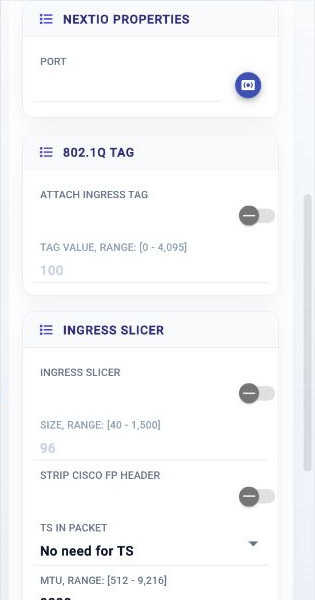
Input Port

Receives traffic from a selected input port.
| Connection | Initial count | Initial pad names | Allowed count | Properties panel |
|---|---|---|---|---|
| Input | None | None | None | Not available |
| Output | 1 | 1 | 1 | Hidden (fixed) |
Configuration Reference
-
Port —
Ingress port selection
Initial value:
Required. -
Attach Ingress Tag —
Attach an ingress tag to packet
Initial value:
Disabled. -
Tag Value —
The value of ingress tag
Initial value:
100. -
Ingress Slicer —
Enable packet slicer
Initial value:
Disabled. -
Size —
Size limit
Initial value:
96. -
Strip Cisco FP Header —
Strip Cisco Fabric Path header
Initial value:
Disabled. -
TS in Packet —
Whether or not there is embedded timestamp in packet
Initial value:
Do not add a timestamp. -
MTU —
Maximum frame size expected on this interface, typical max frame size is 1522
Initial value:
9000. -
Packet Pool —
Packet pool selection
Initial value:
system. -
Packet Pool Size (MB) —
Packet pool size in the unit of MB
Initial value:
128. -
Packet Burst Size —
Packet burst size
Initial value:
0. -
Compute Resources —
Allocate compute resource for the service
Initial value:
1 configured item.
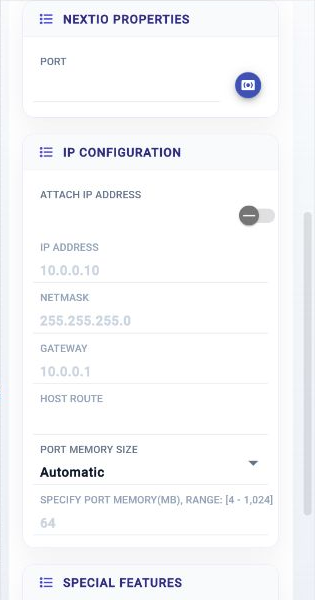
Output Port

Sends service traffic to a selected output port.
| Connection | Initial count | Initial pad names | Allowed count | Properties panel |
|---|---|---|---|---|
| Input | 1 | 1 | 1 | Hidden (fixed) |
| Output | None | None | None | Not available |
Configuration Reference
-
Port —
Egress port selection
Initial value:
Required. -
Attach IP Address —
Enable the IP Configuration on Port
Initial value:
Disabled. -
IP Address —
IP Address
Initial value:
10.0.0.10. -
Netmask —
Network Mask
Initial value:
255.255.255.0. -
Gateway —
Gateway
Initial value:
10.0.0.1. -
Host Route —
Use this egress interface to reach IPs
Initial value:
not set.
-
Port Memory Size —
Automatically manage the packet memory for this port
Initial value:
0. -
Specify Port Memory(MB) —
Packet buffer size allocated to this port when automatic memory management is false
Initial value:
64. -
Enable Tx when Link Down —
Enable Tx without Rx link, module specific
Initial value:
Disabled. -
Compute Resources —
Allocate compute resource for the service
Initial value:
1 configured item.
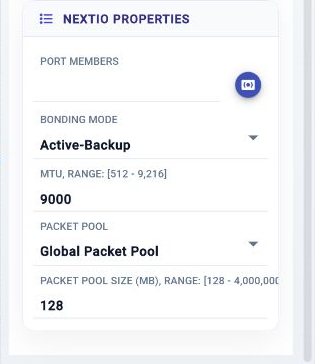
Bond Port In

Bond port traffic flow ingress direction
| Connection | Initial count | Initial pad names | Allowed count | Properties panel |
|---|---|---|---|---|
| Input | None | None | None | Not available |
| Output | 1 | 1 | 1 | Hidden (fixed) |
Configuration Reference
-
Port Members —
Ingress port member selection
Initial value:
Required. -
Bonding Mode —
Bonding Mode
Initial value:
active-backup. -
Aggregator Mode —
Aggregation Mode
Initial value:
stable. -
MTU —
Maximum frame size expected on this interface, typical max frame size is 1522
Initial value:
9000. -
Packet Pool —
Packet pool selection
Initial value:
system. -
Packet Pool Size (MB) —
Packet pool size in the unit of MB
Initial value:
128.
Bond Port Out

Bond port egress
| Connection | Initial count | Initial pad names | Allowed count | Properties panel |
|---|---|---|---|---|
| Input | 1 | 1 | 1 | Hidden (fixed) |
| Output | None | None | None | Not available |
Configuration Reference
-
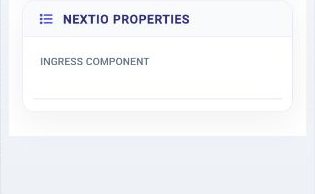
Ingress Component —
Use the same ports defined in the ingress
Initial value:
Required.
Virtual Input Port

Receives traffic from a virtual connection shared with another service.
| Connection | Initial count | Initial pad names | Allowed count | Properties panel |
|---|---|---|---|---|
| Input | None | None | None | Not available |
| Output | 1 | 1 | 1–32 | Count and names editable |
Configuration Reference
-
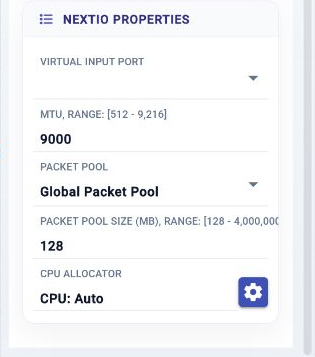
Virtual Input Port —
Virtual input port
Initial value:
Required. -
MTU —
Maximum frame size expected on this interface, typical max frame size is 1522
Initial value:
9000. -
Packet Pool —
Packet pool selection
Initial value:
system. -
Packet Pool Size (MB) —
Packet pool size in the unit of MB
Initial value:
128. -
Compute Resources —
Allocate compute resource for the service
Initial value:
1 configured item.
Virtual Output Port

Sends traffic to a virtual connection shared with another service.
| Connection | Initial count | Initial pad names | Allowed count | Properties panel |
|---|---|---|---|---|
| Input | 1 | 1 | 1–32 | Count and names editable |
| Output | None | None | None | Not available |
Configuration Reference
-
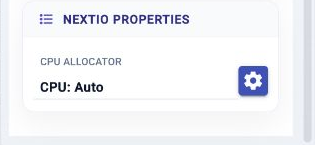
Compute Resources —
Allocate compute resource for the service
Initial value:
1 configured item.
ERSPAN Port

Receives ERSPAN traffic and makes it available to the service.
| Connection | Initial count | Initial pad names | Allowed count | Properties panel |
|---|---|---|---|---|
| Input | None | None | None | Not available |
| Output | 1 | 1 | 1–32 | Count and names editable |
Configuration Reference
-
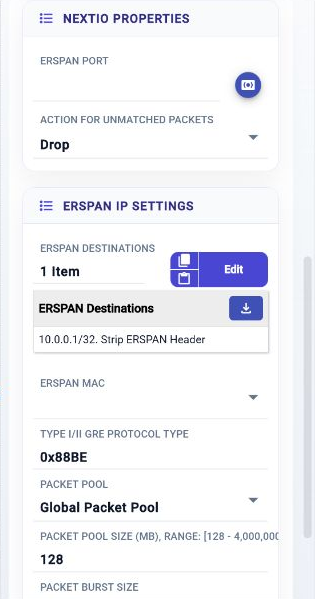
ERSPAN Port —
ERSPAN port selection
Initial value:
Required. -
Action for Unmatched Packets —
Action for unmatched packets
Initial value:
drop. -
ERSPAN Destinations —
ERSPAN Destination List
Initial value:
1 configured item. -
ERSPAN MAC —
ERSPAN IP MAC binding
Initial value:
not set.
-
Type I/II GRE Protocol Type —
ERSPAN Type I/II GRE Protocol Type
Initial value:
0x88BE. -
Packet Pool —
Packet pool selection
Initial value:
system. -
Packet Pool Size (MB) —
Packet pool size in the unit of MB
Initial value:
128. -
Packet Burst Size —
Packet burst size
Initial value:
0. -
Compute Resources —
Allocate compute resource for the service
Initial value:
1 configured item.
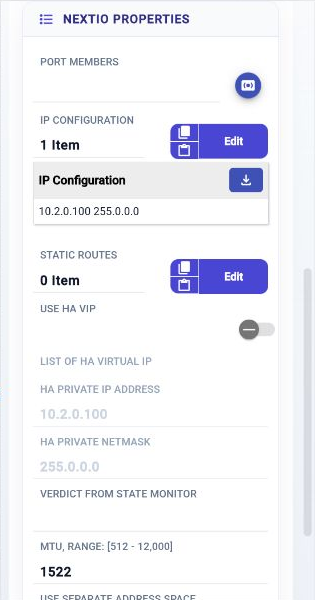
OS Port

Connects a NextIO service to an operating-system network interface.
| Connection | Initial count | Initial pad names | Allowed count | Properties panel |
|---|---|---|---|---|
| Input | 1 | 1 | 1 | Names editable |
| Output | 1 | 1 | 1 | Names editable |
Configuration Reference
-
Port Members —
OS port member selection
Initial value:
Required. -
IP Configuration —
OS port IP, VLAN, and gateway configuration
Initial value:
1 configured item. -
Static Routes —
Non-default routes for networks reached through this OS port
Initial value:
None. -
Use HA VIP —
Use High Availability Virtual IP
Initial value:
Disabled. -
List of HA Virtual IP —
HA Virtual IP address assigned to the port
Initial value:
Required. -
HA Private IP Address —
IP address assigned to the HA port
Initial value:
10.2.0.100. -
HA Private Netmask —
IP netmask assigned to HA port
Initial value:
255.0.0.0. -
Verdict from State Monitor —
Active based on the verdict from the State Monitor Component
Initial value:
not set.
-
MTU —
Maximum transmit unit
Initial value:
1522. -
Use Separate Address Space —
Use separate network address space
Initial value:
Disabled. -
Network Address Space Name —
Network address space name, single word
Initial value:
Default.
Packet Reader

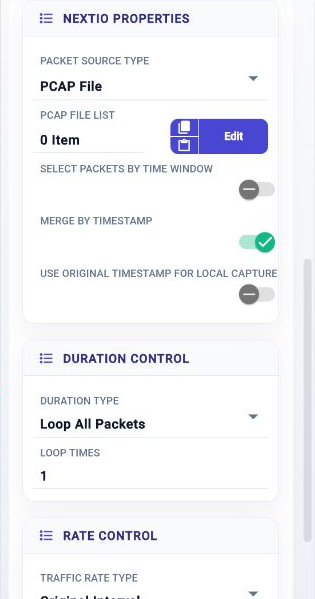
Reads packets from a selected source into the service.
| Connection | Initial count | Initial pad names | Allowed count | Properties panel |
|---|---|---|---|---|
| Input | None | None | None | Not available |
| Output | 1 | 1 | 1 | Names editable |
Configuration Reference
-
Packet Source Type —
Type of packet source
Initial value:
PCAP file. -
PCAP File List —
PCAP File List
Initial value:
None. -
Select Packets by Time Window —
Select packets by time window
Initial value:
Disabled. -
List of time window —
List of time window
Initial value:
None. -
Merge by Timestamp —
Merge packets from multiple PCAPs by timestamp
Initial value:
Enabled. -
Use Original Timestamp for Local Capture —
Attach the original timestamp for local capture
Initial value:
Disabled. -
Duration Type —
Duration type
Initial value:
By loop count. -
Packet Count —
Xmit packet count
Initial value:
1000. -
Duration (Day:Hour:Minute.Second) —
Duration defined by Day:Hour:Minute.Second
Initial value:
00:00:01.00. -
Loop times —
Loop the PCAP List
Initial value:
1. -
Traffic Rate Type —
Select how to specify traffic rate
Initial value:
Original packet intervals. -
Packet Rate (pps) —
Send rate in packets/second
Initial value:
1000. -
Packet Rate (Kpps) —
Send rate in thousands of packets/second
Initial value:
1. -
Packet Rate (Mpps) —
Send rate in millions of packets/second
Initial value:
1. -
Throughput (Kbps) —
Send throughput in kilobits/second
Initial value:
1000. -
Throughput (Mbps) —
Send throughput in megabits/second
Initial value:
1. -
Throughput (Gbps) —
Send throughput in gigabits/second
Initial value:
1. -
Packet Pool Size (MB) —
Packet pool size in the unit of MB
Initial value:
1024.
OS VDev

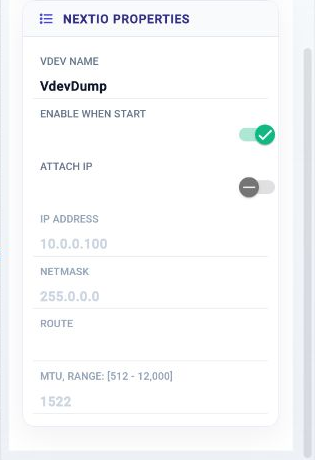
Creates an operating-system virtual device for a NextIO service.
| Connection | Initial count | Initial pad names | Allowed count | Properties panel |
|---|---|---|---|---|
| Input | 1 | 1 | 1 | Hidden (fixed) |
| Output | 1 | 1 | 1 | Hidden (fixed) |
Configuration Reference
-
VDev Name —
Virtual device name
Initial value:
VdevDump. -
Enable When Start —
Start the device in enable state
Initial value:
Enabled. -
Attach IP —
Attach an IP address
Initial value:
Disabled. -
IP Address —
IP address assigned to the port
Initial value:
10.0.0.100. -
Netmask —
IP address netmask
Initial value:
255.0.0.0. -
Route —
IP route to add if necessary
Initial value:
not set.
-
MTU —
Maximum transmit unit
Initial value:
1522.
Serial Cap Tap

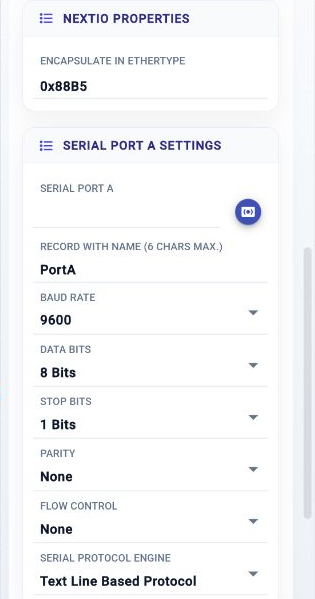
Captures data from one or two serial-port sources.
| Connection | Initial count | Initial pad names | Allowed count | Properties panel |
|---|---|---|---|---|
| Input | 0 | None | 0 | Hidden (fixed) |
| Output | 1 | 1 | 1 | Names editable |
Configuration Reference
-
Encapsulate in EtherType —
EtherType used to encapsulate serial data such as 0x88B5
Initial value:
0x88B5. -
Serial Port A —
Serial port A
Initial value:
Required. -
Record with name (6 chars max.) —
Label for the port A in the record SMAC, 6 chars max.
Initial value:
PortA. -
Baud rate —
Baud Rate
Initial value:
b9600. -
Data bits —
The number of data bits
Initial value:
b8. -
Stop bits —
The number of stop bits
Initial value:
b1. -
Parity —
Parity
Initial value:
none. -
Flow Control —
Flow Control
Initial value:
none. -
Serial Protocol Engine —
Serial Protocol Engine
Initial value:
Text line. -
Fixed Message Length —
Fixed message length
Initial value:
16. -
TLV Tag Length —
TLV Tag length
Initial value:
2. -
TLV Length Byte Count —
TLV length byte count
Initial value:
2. -
TLV Length Endian —
TLV length endian
Initial value:
big. -
Cross connect the traffic between Port A and B —
Cross connect the traffic between Port A and B
Initial value:
Enabled. -
Enable Serial Port B —
Enable Serial port B
Initial value:
Disabled. -
Serial Port B —
Serial port B
Initial value:
Required. -
Record with name (6 chars max.) —
Label for the port B in the record SMAC, 6 chars max.
Initial value:
PortB. -
Baud rate —
Baud Rate
Initial value:
b9600. -
Data bits —
The number of data bits
Initial value:
b8. -
Stop bits —
The number of stop bits
Initial value:
b1. -
Parity —
Parity
Initial value:
none. -
Flow Control —
Flow Control
Initial value:
none. -
Serial Protocol Engine —
Serial Protocol Engine
Initial value:
Text line. -
Fixed Message Length —
Fixed message length
Initial value:
16. -
TLV Tag Length —
TLV Tag length
Initial value:
2. -
TLV Length Byte Count —
TLV length byte count
Initial value:
2. -
TLV Length Endian —
TLV length endian
Initial value:
big.
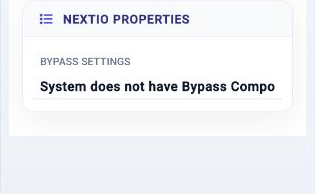
Bypass Settings

Controls bypass behavior for the selected traffic-port pair.
| Connection | Initial count | Initial pad names | Allowed count | Properties panel |
|---|---|---|---|---|
| Input | None | None | None | Not available |
| Output | None | None | None | Not available |
Configuration Reference
-
Bypass Settings —
Power on bypass settings
Initial value:
Required.