Use these components to generate test traffic, simulate applications, measure performance, replay packets, or emulate network conditions.
Component Reference
Confirm test endpoints, rates, durations, and expected traffic impact before starting a test service.
NextIO network validation tools This page documents 6 components in the Testing Tools palette group.
For the shared Name, Notes, display, and pad-editing controls, see Common Component Properties.
STL PktGen

Generates stateless test traffic from configured streams.
| Connection | Initial count | Initial pad names | Allowed count | Properties panel |
|---|---|---|---|---|
| Input | 0 | None | 0 | Hidden (fixed) |
| Output | 1 | 1 | 1 | Hidden (fixed) |
Configuration Reference
-
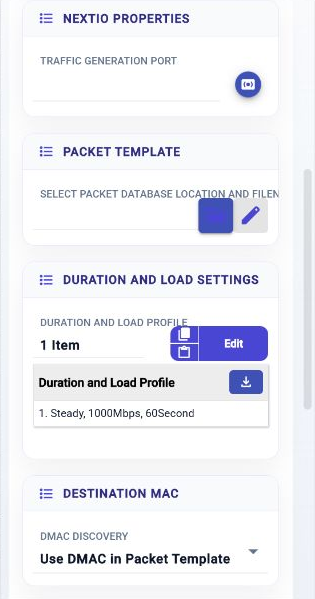
Traffic Generation Port —
Select traffic generation port
Initial value:
Required. -
Port AutoNeg —
Select port autonegotiation mode
Initial value:
Required. -
Port Speed —
Select port link speed
Initial value:
Required. -
Select Packet Database Location and Filename —
Select location to store the uploaded packets
Initial value:
Required. -
Duration and Load Profile —
Duration and Load Profile
Initial value:
1 configured item. -
DMAC Discovery —
Destination MAC discovery
Initial value:
Packet template. -
Fixed DMAC —
Fixed Destination MAC
Initial value:
00:01:00:00:00:01. -
Source IP for ARP —
ARP From Source IP
Initial value:
not set.
-
Target/Gateway IP to ARP —
ARP the destination or gateway IP address
Initial value:
not set.
-
Packet Length Distribution —
Packet Length Distribution
Initial value:
original. -
Fixed Length (Include FCS) —
Fixed Length (Include FCS)
Initial value:
1024. -
Fixed List of Length (Include FCS) —
Fixed Lengths (Include FCS)
Initial value:
64,128,256,512,1024. -
IMix Length Distribution —
Internet Mix traffic length distribution
Initial value:
3 configured items. -
Method to Fill Payload —
Fill Payload with Method
Initial value:
random. -
Text Pattern —
Text Pattern used to fill
Initial value:
Filled with Text. -
Hex Pattern —
Hex Pattern used to fill
Initial value:
01020304_AABBCCDD. -
Modifier List —
List of modifiers
Initial value:
None. -
Disable MAC Filter (Promiscuous) —
Disable MAC filter, enable promiscuous mode
Initial value:
Enabled.
AppSim Center

Builds and runs application traffic simulations.
| Connection | Initial count | Initial pad names | Allowed count | Properties panel |
|---|---|---|---|---|
| Input | 0 | None | 0 | Hidden (fixed) |
| Output | 0 | None | 1 | Hidden (fixed) |
Configuration Reference
-
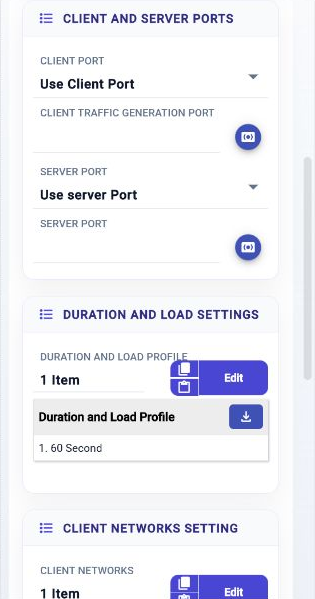
Client Port —
Use client port
Initial value:
enable. -
Client Traffic Generation Port —
Select traffic generation port for client
Initial value:
Required. -
Client Port AutoNeg —
Select port autonegotiation mode
Initial value:
Required. -
Client Port Speed —
Select port link speed
Initial value:
Required. -
Server Port —
Use server port
Initial value:
enable. -
Server Port —
Select traffic generation port for server
Initial value:
Required. -
Server Port AutoNeg —
Select port autonegotiation mode
Initial value:
Required. -
Server Port Speed —
Select port link speed
Initial value:
Required. -
Duration and Load Profile —
Duration and Load Profile
Initial value:
1 configured item. -
Client Networks —
Client Network
Initial value:
Client Net 1. -
Server Networks —
Server Network Settings
Initial value:
Server Net 1. -
App Templates —
Application traffic templates
Initial value:
HTTP.
Bit Error Rate

Measures bit errors across a generated test stream.
| Connection | Initial count | Initial pad names | Allowed count | Properties panel |
|---|---|---|---|---|
| Input | 0 | None | 0 | Hidden (fixed) |
| Output | 1 | 1 | 1 | Hidden (fixed) |
Configuration Reference
-
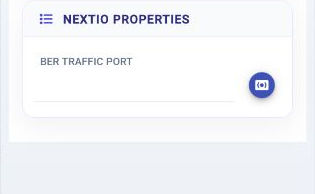
BER Traffic Port —
Select BER traffic generation port
Initial value:
Required. -
BER Mode —
Select BER mode
Initial value:
Required. -
Port AutoNeg —
Select port auto-negotiation mode
Initial value:
Required. -
Port Speed —
Select port link speed
Initial value:
Required. -
BER Test Profile —
Bit Error Rate test profile
Initial value:
1 configured item. -
BER Test Profile —
Bit error rate test Profile
Initial value:
1 configured item. -
Test Topology —
Frame Mode Test Topology
Initial value:
l2. -
Destination MAC —
Fixed Destination MAC
Initial value:
00:01:00:00:00:01. -
Source MAC —
Fixed Source MAC
Initial value:
00:02:00:00:00:02. -
Use 802.1Q VLAN —
Use 802.1Q VLAN layer to guide packets
Initial value:
Disabled. -
VLAN ID —
VLAN ID
Initial value:
100. -
Ethertype —
Ethernet Type Field
Initial value:
34997. -
Container Frame Length —
Fixed container frame length
Initial value:
9000.
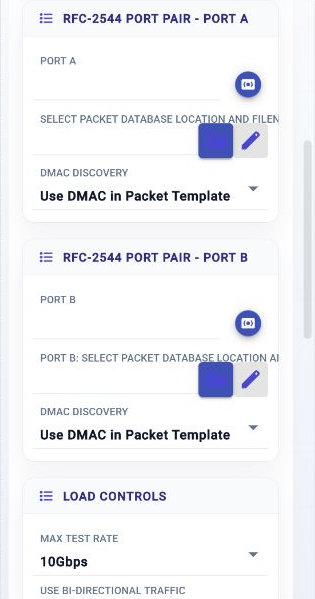
RFC-2544

RFC 2544 network performance test
| Connection | Initial count | Initial pad names | Allowed count | Properties panel |
|---|---|---|---|---|
| Input | 0 | None | 0 | Hidden (fixed) |
| Output | 0 | None | 0 | Hidden (fixed) |
Configuration Reference
-
Port A —
RFC-2544 Port A
Initial value:
Required. -
Port-A AutoNeg —
Select port autonegotiation mode
Initial value:
Required. -
Port-A Speed —
Select port link speed
Initial value:
Required. -
Select Packet Database Location and Filename —
Select location to store the uploaded packets
Initial value:
Required. -
DMAC Discovery —
Destination MAC discovery
Initial value:
Packet template. -
Fixed DMAC —
Fixed Destination MAC
Initial value:
00:01:00:00:00:01. -
Source IP for ARP —
ARP From Source IP
Initial value:
not set.
-
Target/Gateway IP to ARP —
ARP the destination or gateway IP address
Initial value:
not set.
-
Port B —
RFC-2544 Port B
Initial value:
Required. -
Port-B AutoNeg —
Select port autonegotiation mode
Initial value:
Required. -
Port-B Speed —
Select port link speed
Initial value:
Required. -
Port B: Select Packet Database Location and Filename —
Select location to store the packets for Port B
Initial value:
Required. -
DMAC Discovery —
Destination MAC discovery
Initial value:
Packet template. -
Fixed DMAC —
Fixed Destination MAC
Initial value:
00:01:00:00:00:01. -
Source IP for ARP —
ARP From Source IP
Initial value:
not set.
-
Target/Gateway IP to ARP —
ARP the destination or gateway IP address
Initial value:
not set.
-
Max Test Rate —
Max Test Bit Rate
Initial value:
10. -
Use Bi-directional Traffic —
Send traffic on both ports
Initial value:
Enabled. -
Load Search Low Bound (%) —
The minimum load to search in percentage
Initial value:
0. -
Load Search High Bound (%) —
The maximum load to search in percentage
Initial value:
100. -
Duration (sec.) per Load Iteration —
Test Duration in Seconds per load iteration per packet length
Initial value:
30. -
Minimum Load Resolution (%) —
Minimum load resolution before the end of search
Initial value:
1. -
Acceptable Packet Loss —
Acceptable packet loss
Initial value:
0.01. -
First Offerred Load (%) —
The starting load used at the begining of the test
Initial value:
50. -
Max Iterations Per Packet Length —
Max iterations to perform per packet length
Initial value:
30. -
Length Mode —
Packet Length Mode
Initial value:
inc. -
Packet Fixed Length —
Fixed packet length
Initial value:
128. -
Incease Length From —
Increase length from
Initial value:
64. -
Increase Length To —
Increase length to
Initial value:
9216. -
Increase Step —
Length step
Initial value:
128. -
Decrease Length From —
Decrease length from
Initial value:
64. -
Decrease Length To —
Decrease length to
Initial value:
9216. -
Decrease Step —
Length step
Initial value:
128. -
List of Packet Length —
List of packet length
Initial value:
128, 256, 512, 1024, 1518. -
Disable MAC Filter (Promiscuous) —
Disable MAC filter, enable promiscuous mode
Initial value:
Enabled.
Packet Replay

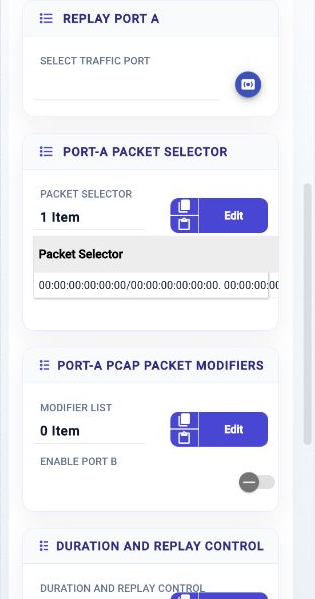
Packet replay
| Connection | Initial count | Initial pad names | Allowed count | Properties panel |
|---|---|---|---|---|
| Input | 0 | None | 0 | Hidden (fixed) |
| Output | 0 | None | 0 | Hidden (fixed) |
Configuration Reference
-
Select Traffic Port —
Select traffic generation port A
Initial value:
Required. -
Port AutoNeg —
Select port autonegotiation mode
Initial value:
Required. -
Port Speed —
Select port link speed
Initial value:
Required. -
Packet Selector —
Port-A Packet Selector
Initial value:
1 configured item. -
Modifier List —
List of modifiers
Initial value:
None. -
Enable Port B —
Enable replay port B
Initial value:
not set.
-
Replay Port-B —
Select traffic generation port B
Initial value:
Required. -
Port-B AutoNeg —
Select port autonegotiation mode
Initial value:
Required. -
Port-B Speed —
Select port link speed
Initial value:
Required. -
Packet Selector —
Port-B Packet Selector
Initial value:
1 configured item. -
Modifier List —
List of modifiers
Initial value:
None. -
Keep Packet Order reference to Port-A —
Keep Packet Order reference to Port-A
Initial value:
Disabled. -
Duration and Replay Control —
Duration and Load Profile
Initial value:
1 configured item. -
Select PCAP to replay —
Select PCAP location
Initial value:
Required. -
Disable MAC Filter (Promiscuous) —
Disable MAC filter, enable promiscuous mode
Initial value:
Enabled.
WAN Emulator

WAN emulator
| Connection | Initial count | Initial pad names | Allowed count | Properties panel |
|---|---|---|---|---|
| Input | 1 | 1 | 1 | Names editable |
| Output | 1 | 1 | 1 | Names editable |
Configuration Reference
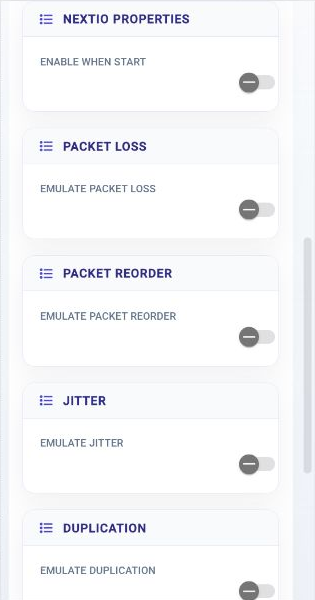
-
Enable when start —
Enable WAN emulator when the service starts
Initial value:
Disabled. -
Emulate Packet Loss —
Enable packet loss emulation
Initial value:
Disabled. -
Loss Rate Numerator —
Packet loss numerator value
Initial value:
0. -
Loss Rate Denominator —
Packet loss denominator value
Initial value:
1. -
Emulate Packet Reorder —
Enable packet reorder emulation
Initial value:
Disabled. -
Reorder Queue Depth —
Queue depth used for reordering packets
Initial value:
0. -
Reorder Trigger Threshold —
Threshold to trigger packet reordering
Initial value:
0. -
Reorder Burst Size —
Burst size for packet reordering
Initial value:
0. -
Emulate Jitter —
Enable packet jitter emulation
Initial value:
Disabled. -
Base Delay (ns) —
Base delay applied to packets in nanoseconds
Initial value:
0. -
Jitter Range (ns) —
Jitter range in nanoseconds
Initial value:
0. -
Max Delay (ns) —
Maximum delay in nanoseconds
Initial value:
0. -
Emulate Duplication —
Enable packet duplication emulation
Initial value:
Disabled. -
Duplication Rate Numerator —
Packet duplication numerator value
Initial value:
0. -
Duplication Rate Denominator —
Packet duplication denominator value
Initial value:
1. -
Duplication Max Copies —
Maximum duplicate packets to generate
Initial value:
1. -
Emulate Bit Error —
Enable bit error insertion
Initial value:
Disabled. -
Bit Error Rate Exponent —
Interpret as BER of 1E-<value>; 0 disables bit error insertion
Initial value:
0. -
Bit Error Packet Offset (bytes) —
Start of the eligible packet region in bytes from packet head
Initial value:
0. -
Bit Error Flip Range (bits) —
Eligible span in bits; 0 extends selection to the end of the packet
Initial value:
0. -
Emulate Bandwidth Limit —
Enable bandwidth shaping emulation
Initial value:
Disabled. -
Rate (bps) —
Bandwidth rate in bits per second
Initial value:
0. -
Bucket Size (bytes) —
Token bucket size in bytes
Initial value:
0.